No More SSH: Control Plane Overrides for Rafay MKS Clusters
Customizing a Kubernetes control plane has always been an uncomfortable exercise. You SSH into a master node, carefully edit a static pod manifest, and then hope nothing breaks. With our latest release, we are replacing that workflow entirely. Control Plane Overrides give you a safe, declarative way to customize the API Server, Controller Manager, and Scheduler for MKS (Managed Kubernetes Service) clusters — Rafay's upstream Kubernetes offering for bare metal and VMs — directly from the Rafay Console or cluster specification.
The Problem: The "SSH and Pray" Workflow
If you run upstream Kubernetes, customizing your control plane typically means SSHing into master nodes and hand-editing static pod manifests under /etc/kubernetes/manifests/. That approach has several well-known failure modes:
- Fragile — a single YAML formatting error can crash your API server and take down the cluster.
- Inconsistent — manual changes applied node by node lead to configuration drift, where different master nodes end up with different settings.
- Irreversible — there is no rollback button. A bad edit stays broken until someone fixes it manually, often under pressure.
- Not auditable — there is no record of who changed what, when, or why.
For teams operating multiple clusters or enforcing compliance policies, this is not a sustainable model.
The Solution: Safe, Declarative Customization

Rafay now eliminates the need to touch static manifests. For MKS clusters, you define your desired state in the Rafay Console or cluster spec, and the platform applies those changes consistently across every control plane node — with no SSH required.
Overrides apply uniformly across all control plane nodes. If you have a three-node control plane, the same configuration reaches every API server, every controller manager, and every scheduler instance.
Built-in Safety Net: Automatic Rollback
Made a mistake? Rafay has you covered. If an applied override causes a control plane component to fail, the platform automatically detects the failure and reverts to the last known good configuration — bringing your control plane back to a healthy state without any manual intervention. No war room. No midnight SSH session. No cluster stuck in a broken state. You fix the config and try again.
What You Can Customize
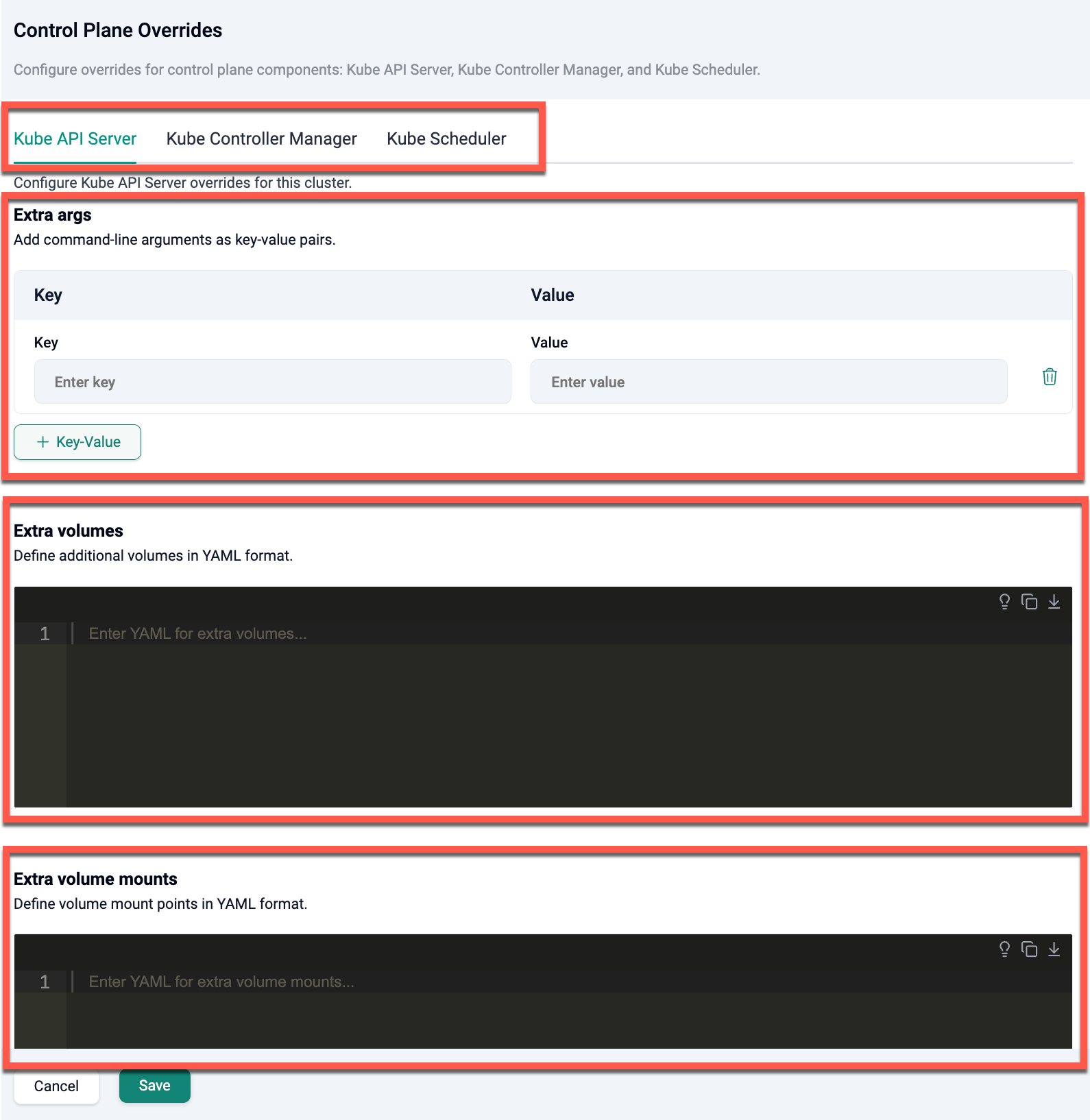
For each of the three control plane components — Kube API Server, Kube Controller Manager, and Kube Scheduler — you can now configure:
| Section | Description |
|---|---|
| Extra Args | Key-value pairs for command-line flags (e.g., profiling: "false", v: "4") |
| Extra Volumes | Additional volumes such as emptyDir or hostPath |
| Extra Volume Mounts | Mount paths for those volumes inside the control plane containers |
The full static pod manifest is not exposed. Only these specific sections are configurable, which keeps the surface area for misconfiguration small and the cluster stable.
Use Cases
Security hardening. Disable profiling across all control plane components or enforce specific TLS cipher suites for compliance requirements. A single extraArgs entry applies the change across every master node via the API.
Feature gates. Enable or disable Kubernetes feature gates without rebuilding the cluster. This works both at cluster creation (Day 0) and after the cluster is already running (Day 2).
Audit logging. Mount a dedicated volume for audit log output and configure the API server to write to it — no host-level access needed.
Admission plugins. Extend or modify the list of admission plugins, including security admission controllers like PodSecurity.
Implementation
Cluster Specification
Overrides are defined under controlPlaneOverrides in the cluster spec and are fully version-controllable alongside the rest of your infrastructure configuration:
controlPlaneOverrides:
  kubeApiserver:
    extraArgs:
      profiling: "false"
      v: "4"
    extraVolumes: |
      - name: safe-dir
        emptyDir: {}
    extraVolumeMounts: |
      - name: safe-dir
        mountPath: /tmp/safe-apiserver
        readOnly: false
  kubeControllerManager:
    extraArgs:
      profiling: "false"
      v: "2"
  kubeScheduler:
    extraArgs:
      profiling: "false"
      v: "2"
Only the fields you need to customize must be provided. Existing defaults are preserved unless explicitly overridden.
A Note on Comma-Separated Arguments
Some arguments — such as enable-admission-plugins, feature-gates, and tls-cipher-suites — accept comma-separated values. When overriding these, you must supply the complete value, including any existing entries you want to keep. Providing only the new value replaces the entire list, which can break cluster functionality if required entries are dropped.
Day 2 Operations
Control Plane Overrides are fully supported after cluster provisioning. Navigate to Clusters → Select Cluster → Configuration → Control Plane Overrides → Edit to update settings on a running cluster.
Verifying Applied Configuration
Once overrides are applied, you can confirm the result without SSH. Navigate to Clusters → Select Cluster → Nodes → Node Actions → View Control Plane Config to see a read-only view of the live manifests for each control plane node.
Summary
Control Plane Overrides bring the same API-driven model you already use for workloads to the Kubernetes infrastructure itself. No more manual edits, no more configuration drift, and full auditability — from Day 0 through the life of the cluster. And if something goes wrong, automatic rollback ensures your cluster never stays in a broken state.
-
Read the Docs
Full reference for Control Plane Overrides, including all configurable fields and cluster spec examples.