Delivering NVIDIA RAG Blueprints as a Self-Service GPU Service
Retrieval-Augmented Generation (RAG) has become one of the most common architectures for enterprise generative AI. Instead of relying only on knowledge embedded in a large language model, RAG enables organizations to ground responses using their own documents, data, and knowledge repositories.
But deploying a production RAG environment involves much more than launching an LLM. A complete RAG stack can require embedding models, reranking models, document ingestion pipelines, search infrastructure, vision-language models, GPU scheduling, networking, ingress, model caches, and application endpoints.
For organizations operating GPU infrastructure, the challenge is straightforward:
How do you make this complete RAG stack available as a simple, repeatable service without requiring every user to become an expert in Kubernetes, NVIDIA NIM, Helm, networking, and GPU infrastructure?
One approach is to package NVIDIA's RAG Blueprint as a self-service offering on top of a neocloud's GPU infrastructure. The result looks much more like a cloud service than a traditional Kubernetes deployment.
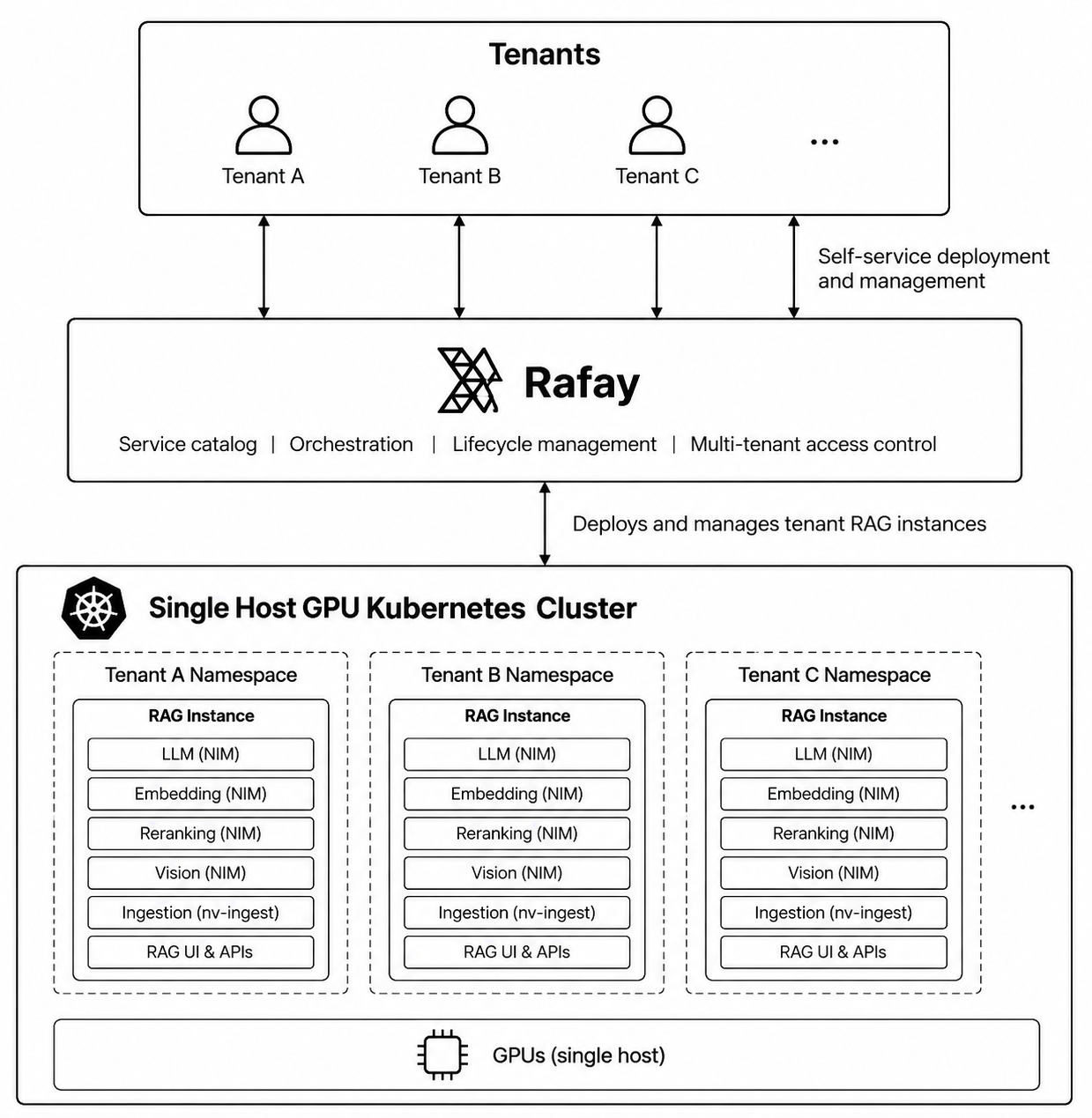
Architecture
At a high level, the architecture has three layers:
Users → Rafay GPU PaaS → GPU Kubernetes Cluster
Users consume the NVIDIA RAG Blueprint through a self-service catalog. Rafay handles deployment of all the RAG blueprint components and lifecycle automation, while Kubernetes provides the runtime environment for the RAG stack.
User
  │
  ▼
Rafay Self Service Portal (GPU PaaS)
  │
  ▼
GPU Kubernetes Cluster
  │
  └── NVIDIA RAG Environment
Depending on infrastructure and isolation requirements, the RAG environment can run on shared Kubernetes infrastructure or on a Kubernetes cluster dedicated to a specific tenant.
1. Consume RAG as a Service
The experience begins with the user.
Instead of receiving Kubernetes credentials and a collection of Helm charts, users access a self-service catalog and select the NVIDIA RAG Blueprint.
The underlying SKU packages NVIDIA's RAG Blueprint as a deployable service. The blueprint includes a Llama 3.1 70B LLM, Nemotron embedding and reranking models, a vision-language model, and the nv-ingest document ingestion pipeline.
From the user's perspective, the deployment experience can remain intentionally simple.
For example, the service can expose only parameters that matter to the application owner, such as GPU allocations for individual model services. Infrastructure-specific configuration can remain hidden and centrally controlled by the platform team.
A typical user experience becomes:
- Select the NVIDIA RAG service
- Provide a name
- Configure permitted GPU allocations
- Deploy
The platform team handles:
- Service blueprint definition
- Kubernetes configuration
- Supported versions
- Networking and DNS
- GPU infrastructure
- Policies and quotas
- Lifecycle management
The user therefore consumes RAG as a platform service rather than as a collection of infrastructure components.
2. Rafay Provides the GPU PaaS Control Layer
Between the user and Kubernetes sits the Rafay GPU PaaS Platform. Rafay converts the NVIDIA RAG Blueprint into a reusable service through several platform capabilities.
Self-Service Catalog
The NVIDIA RAG Blueprint is registered as a billable SKU and exposed through the service catalog. Rather than exposing every Helm parameter, Kubernetes object, credential, and infrastructure dependency, the SKU presents a curated set of configuration options.
Workflow Automation
When a user deploys the service, Rafay executes a series of workflows that automate the deployment of the RAG blueprint on the Kubernetes cluster, create ingress resources and program DNS for the user to access the app via a https URL.
The workflow:
- Creates a Kubernetes namespace for the environment.
- Authenticates to NVIDIA NGC.
- Runs the NVIDIA RAG Blueprint Helm deployment.
- Creates ingress resources for the RAG UI and NIM APIs.
- Returns the application endpoint to the user.
The service therefore encapsulates the operational logic required to deploy and expose the complete RAG environment.
3. Each RAG Instance Gets Its Own Kubernetes Namespace
A RAG deployment runs inside its own Kubernetes namespace.
For example:
GPU Kubernetes Cluster

├── namespace: rag-environment-a
│     └── NVIDIA RAG Stack
│
├── namespace: rag-environment-b
│     └── NVIDIA RAG Stack
│
└── namespace: rag-environment-c
      └── NVIDIA RAG Stack
This provides a clean deployment boundary for each RAG environment. It also gives the platform a natural place to apply Kubernetes and platform controls such as:
- RBAC
- Resource quotas
- GPU quotas
- Network policies
- Monitoring
- Usage metering
- Audit logging
- Lifecycle policies
For environments running on shared Kubernetes infrastructure, namespaces provide logical separation between deployments.
4. Shared or Dedicated Kubernetes Deployment Models
Not every RAG deployment has the same infrastructure requirements. Some organizations may prefer to maximize GPU utilization by running multiple RAG environments on a shared Kubernetes cluster. Others may require a dedicated Kubernetes cluster because of:
- Security requirements
- Compliance requirements
- Dedicated network policies
- Customer-specific Kubernetes configuration
- Dedicated GPU capacity
- Performance isolation
- Separate maintenance windows
- Requirements to avoid sharing a Kubernetes control plane
A neocloud can support both models.
                 Rafay GPU PaaS
                       │
          ┌────────────┴────────────┐
          │                         │
          ▼                         ▼

 Shared Kubernetes          Dedicated Kubernetes
     Cluster                     Cluster
          │                         │
          ▼                         ▼
   RAG Environments          Dedicated RAG
                             Environment
In the shared-cluster model, multiple RAG environments consume resources from the same Kubernetes and GPU infrastructure. In the dedicated-cluster model, the Kubernetes cluster itself becomes the isolation boundary.
Importantly, the user experience does not need to change. The same NVIDIA RAG service can be selected from the catalog and deployed through the same automation workflow, regardless of whether the target is shared or dedicated infrastructure.
For neoclouds, this enables multiple service tiers from the same platform:
| Deployment Model | Isolation Boundary | Typical Use Case |
|---|---|---|
| Shared Kubernetes | Namespace | Development, testing, cost-efficient RAG |
| Dedicated Kubernetes | Cluster | Enterprise and security-sensitive workloads |
| Dedicated Kubernetes + Dedicated GPUs | Cluster + infrastructure | Performance-sensitive or highly isolated workloads |
This gives providers flexibility to align infrastructure with the requirements of each workload.
5. The NVIDIA RAG Stack
Each deployed instance contains the services required to implement the RAG pipeline. Conceptually, it looks like the following:
NVIDIA RAG Environment
│
├── Llama 3.1 70B
│      └── LLM inference through NVIDIA NIM
│
├── Nemotron Embedding Model
│
├── Nemotron Reranking Model
│
├── Vision-Language Model
│
├── nv-ingest
│      └── Document ingestion pipeline
│
└── Elasticsearch
       └── Search / retrieval backend
The NVIDIA Blueprint combines these capabilities into a complete multimodal RAG environment rather than requiring users to assemble them independently.
LLM
The Llama 3.1 70B model performs answer generation after relevant information has been retrieved.
Embedding Model
The embedding service transforms document content and queries into representations that can be used during retrieval.
Reranking
The reranking model evaluates candidate retrieval results and improves the context passed to the LLM.
Vision-Language Model
The VLM enables processing of visual information contained in multimodal documents.
nv-ingest
nv-ingest provides the document ingestion pipeline.
Documents can contain text, tables, and images. The ingestion pipeline processes those assets before they become available to the RAG system.
Elasticsearch
Elasticsearch provides the search backend required by the RAG deployment and is operated through the Elastic Cloud on Kubernetes operator.
Together, these components provide a complete RAG environment.
6. From Deployment to RAG Application
Once the instance is ready, users interact with the RAG UI using a web browser. A typical workflow looks like:
Deploy RAG
    │
    ▼
Open RAG UI
    │
    ▼
Create Collection
    │
    ▼
Upload Documents
    │
    ▼
nv-ingest Processes Content
    │
    ▼
Ask Questions
    │
    ▼
Retrieve Relevant Context
    │
    ▼
LLM Generates Grounded Response
The ingestion pipeline processes content including text, tables, and images. The RAG pipeline then retrieves relevant information and supplies that context to the LLM before generating a response.
The infrastructure complexity remains hidden behind the service interface.
RAG Infrastructure Becomes a Repeatable Service
The value of this architecture is not simply that it can deploy NVIDIA's RAG Blueprint. The larger benefit is that it transforms a complex AI application stack into a repeatable service that can be monetized by a neocloud as a value added service.
Without Rafay's platform abstraction, application teams will need to understand:
Kubernetes
    +
NVIDIA GPU Operator
    +
NVIDIA NIM Operator
    +
NIM Services
    +
Helm
    +
Elasticsearch
    +
ECK
    +
nv-ingest
    +
Ingress
    +
DNS
    +
GPU Allocation
With a GPU PaaS service model, the experience becomes streamlined for users. That is a significant operational simplification.
Select NVIDIA RAG
        ↓
Choose Infrastructure
        ↓
Configure
        ↓
Deploy
        ↓
Open RAG UI
-
Free Org
Sign up for a free Org if you want to try this yourself with our Get Started guides.
-
 Live Demo
Schedule time with us to watch a demo in action.